Rep Counter Apps That Use Your Camera: What They Count and What They See
A rep counter app logs the reps you type in, or counts them for you. Camera apps that say how they count use a pose model, which turns your body into points. Some score your form; other "AI workout apps" plan without watching. A game like SWADE counts as you play. Before you film yourself, ask where the video goes.
In this guide
- Rep counter app: a log you fill in, or a counter that watches you
- What "AI" does in a workout app: count, check or plan
- How a phone camera sees a rep
- Camera rep counters and AI coaches, compared
- AI form checkers: what a form score can and can't tell you
- Where the video goes: what "on-device" covers
- Check a camera app before you film yourself
- Which one fits you
- SWADE: a camera game, not an all-purpose counter
- Your camera stays on your phone
- What this guide doesn't cover
- Frequently asked questions
Rep counter app: a log you fill in, or a counter that watches you
"Rep counter app" means two things. When we searched Google on October 20, 2026, the top results were about logs: RepCount's store listings, a Reddit thread on tracking reps and weight, then Hevy and Strong. In a log, you type the reps in; the app keeps them. All three log for free; Strong's free version "is limited to 3 custom routines".
The other meaning is an app that counts for you. Google's "People also ask" box opened with it: "Is there an app that counts your reps?" Yes, in three ways:
- The camera. The phone, propped up in front of you, watches you move.
- A motion sensor. A watch, or the phone on your body, feels the move: Motra says it tracks reps from "the motion of your Apple Watch". Our guides to push-up counter apps and squat counter apps compare them for those two moves.
- Your finger. A tap per rep on an exercise counter app, or a clicker.
On October 24, 2026, Google completed "ai rep counter" with "on device". This guide stays on the camera: what it counts, judges and sends.
What "AI" does in a workout app: count, check or plan
On a listing, "AI" can mean three jobs.
- Count. The camera reads each rep and adds it up. GymCam says it counts reps "for ANY exercise".
- Check. The app compares your move with its model of it. FormLens scores a filmed lift or run out of 100, with one fix to work on first; Form Coach scores every rep, live.
- Plan. The AI writes your sessions from your answers and history. Fitbod builds each one for "your fitness level and equipment"; Planfit shows good form in "1,100+ exercise videos". Neither listing describes camera tracking.
Some do two or three: Zing and Tempo plan your training and watch your form; Form Coach counts, scores and plans. So "AI" alone doesn't tell you a camera is watching: look for "camera", "count" and "form" on the listing.
How a phone camera sees a rep
Camera apps that explain how they work describe the same thing: a live skeleton (Form Coach), "joint positions" (FormLens), "dots" marking your movements (Zing's privacy policy). A pose model finds your body in each frame and puts points on it. Google's MediaPipe pose model, for one, marks 33, and its guide calls it "optimized for on-device, real-time fitness applications".
The app turns those points into its own rule: an elbow angle, how far your shoulders drop, how close your hips come to your knees. So a camera counter needs:
- Your whole body in view, or the joints the move uses: GymCam asks you to "step back until your full body is visible in the frame".
- A phone that stays put, on a stable surface or against a wall.
- The angle the app asks for. The lens can't measure a joint it can't see. Form Coach gives each exercise "a placement guide".
Camera rep counters and AI coaches, compared
Read on October 24 and 25, 2026, with US App Store prices. The camera counters we found on the App Store had few ratings, from none to a few dozen; two apps with many ratings, Zing and Tempo, use the camera inside a coaching plan.
| App | What the camera does | Runs on | Where the video goes, in its words | Price (US) |
|---|---|---|---|---|
| Motion Coach (motion-coach.com) | Counts reps and checks form, over a hundred exercises | A web browser | Site: tracking runs "directly in your browser". Policy: for form correction, images with your face masked go to "Google AI (Gemini) in the United States" | Free, "No signup required" |
| Form Coach: Camera Rep Counter | Counts and scores every rep, coaches by voice, builds a plan | iPhone, iPad, Apple Watch, Android | "Your videos, pose data and workouts never leave your device" | Free: "No subscription, no unlock, no ads" |
| GymCam | Counts reps for any exercise; records the set with the count on it | iPhone, iPad, Android | Policy (June 2026): your camera feed "is analysed on your device to count reps and is never uploaded to our servers"; a clip you save stays on your device unless you export it. Labels: "Data Not Collected" (App Store), "No data collected" (Google Play) | Free download; Premium $12.99 a month or $79.99 a year |
| FormLens | Reads a set you film or upload: a score out of 100, one fix, joint angles | iPhone, iPad, Apple Watch | "Your workout videos never leave your phone." Policy (October 2026): the "keypoints and the measurements derived from them" go to its servers in the US, for coaching | Free download; Pro $9.99 a month or $44.99 a year |
| Zing AI | Plans and adjusts your workouts; "Zing Vision" tracks your moves for form feedback | iPhone, Apple Watch, Android | Policy (March 2025): the dots marking your moves are "processed on your device", then stored on its servers after the workout; "we do not get access to the actual videos" | Free download; Premium subscriptions |
| Tempo | Plans your weight training; tracks your joints to guide position and form | iPhone, Apple Watch | Policy (2023): the TrueDepth depth data it uses to count reps and guide form "is never stored, saved, nor does it leave the device" | Membership $39.00 a month |
| SWADE | Reads your moves in two games; counts jumps, squats and push-ups; no form score | iPhone and Android, coming soon | No image or video leaves the phone; with "Help improve SWADE" on, stick-figure samples | Coming soon. Free, energy for more games; Premium optional |
Sources, read October 24 and 25, 2026: each app's US App Store listing and privacy label; Google Play's Data safety labels; Motion Coach's site; the privacy policies of Motion Coach (undated), GymCam (June 2026), FormLens (October 2026), Zing (March 2025) and Tempo (November 2023); Google's MediaPipe guide; Google Suggest. Apple, iPhone, iPad, Apple Watch, App Store, TrueDepth, Google, Google Play, Android, Gemini, MediaPipe, Reddit and the app names in this guide are trademarks of their respective owners. SWADE is independent and is not affiliated with, sponsored or endorsed by any of them.
AI form checkers: what a form score can and can't tell you
An "ai form checker" or a "gym form correction app" helps, if you know what its score measures.
- Points, not feelings. FormLens reports "depth, symmetry and joint angles". No video tells an app whether a move hurts.
- The app's own rule. Each app decides what a good rep looks like; another may score the same rep differently.
- One camera, one side. Set the phone where the app's guide says, or it scores only what it sees.
- Live, or after. Form Coach cues you mid-rep ("elbows tighter"); FormLens reads a set once you've filmed it.
Test a score before you trust it: a few reps you know are clean, a few you know aren't. Does it tell them apart? Our push-up counter guide has a test you can adapt to any move. If a move hurts, stop and see a doctor: a green skeleton isn't a medical check.
Where the video goes: what "on-device" covers
"On-device" can cover four layers, and the apps we read answer differently for each.
| What your workout makes | What it is | What the apps we read say |
|---|---|---|
| The picture | Every frame the camera takes | Stays on the phone, say Form Coach, GymCam, FormLens and SWADE. For form correction, Motion Coach sends images, face masked, to Google's Gemini |
| The points | Dots on your body: your skeleton | Zing's policy: processed on the phone, stored on its servers after the workout. FormLens's policy: sent to its servers for coaching. Form Coach: "pose data" stays. SWADE: a few stick-figure samples, while "Help improve SWADE" is on |
| The numbers | Reps, scores, measurements, usage stats | FormLens sends its measurements with the points; Form Coach, usage stats it calls pseudonymous. SWADE: a game's score and counts; with "Help improve SWADE" on, camera-tracking numbers from Push Flight |
| A recording | A video file of your set | GymCam records the set with the count on it and keeps the clip on your phone unless you export it; Form Coach offers replays and says videos never leave the device; Motion Coach keeps recordings in your browser until you purge them |
An app can keep the video on your phone and still send what it learned from it.
Check a camera app before you film yourself
- Find the camera's job: counting, checking form, or no job at all?
- Find where the video is processed: "on-device", "never leaves", "in your browser". Then ask what that covers: the video, the points, or only the count?
- Read both labels, then the policy. Zing's App Store label doesn't list "Photos or Videos"; its Google Play label lists "Photos and videos". Its policy explains: photos you choose to upload reach its servers; from your workouts, only the dots do. A label is a start, not the answer.
- Search the policy for "camera", "video" and "image", and note its date: Tempo's is from 2023; Motion Coach's has none.
- Try airplane mode. If it still counts, the counting runs on the phone. That doesn't prove nothing is sent later.
- Check what it records: is there a video file, where is it kept, and does it leave only when you share it?
Which one fits you
| Your situation | Best fit | Why |
|---|---|---|
| You lift and want your sets and weights kept | A log: RepCount, Hevy, Strong | You type, it remembers |
| You want your reps counted hands-free | A camera counter | Prop the phone up and step back |
| You want feedback on your form | A form checker, live or on a filmed set | Test it on reps you know |
| You want a plan written for you | An AI coach app | Some plan without a camera; others watch too |
| You'd rather play than count | A camera game | The count comes with the game; for push-ups, see our guide to push-up game apps |
| You don't want a camera on you | A log, a watch or a tap counter | Nothing films you |
| Pain, an injury or rehab | A doctor first | An app's score isn't a diagnosis |
| You're under 15 | Not SWADE | SWADE is made for players aged 15 and up |
SWADE: a camera game, not an all-purpose counter
SWADE is a fitness game app, coming soon to iPhone and Android: prop up your phone, and its camera turns your moves into the controller. It counts, but only inside its two games.
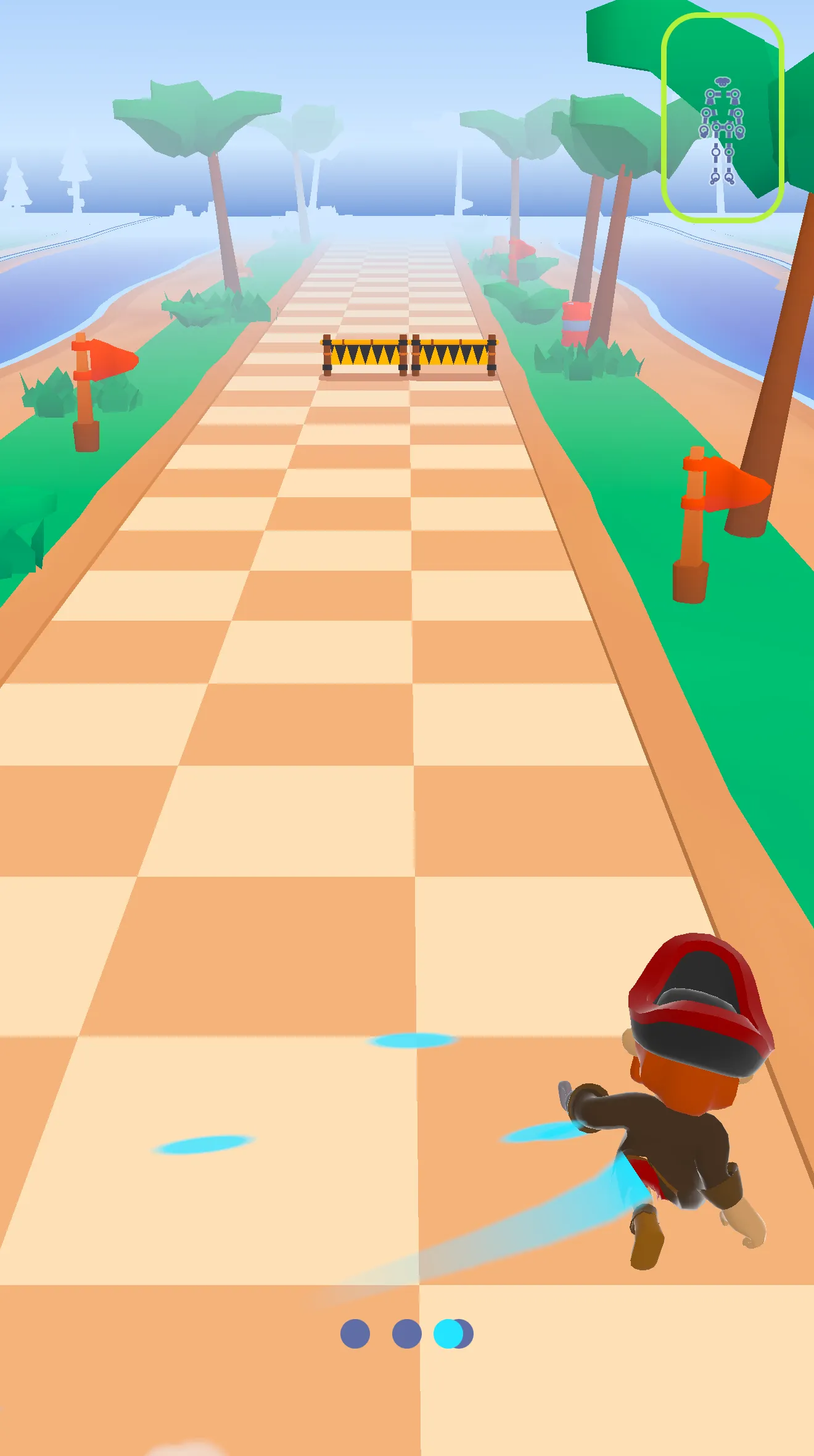
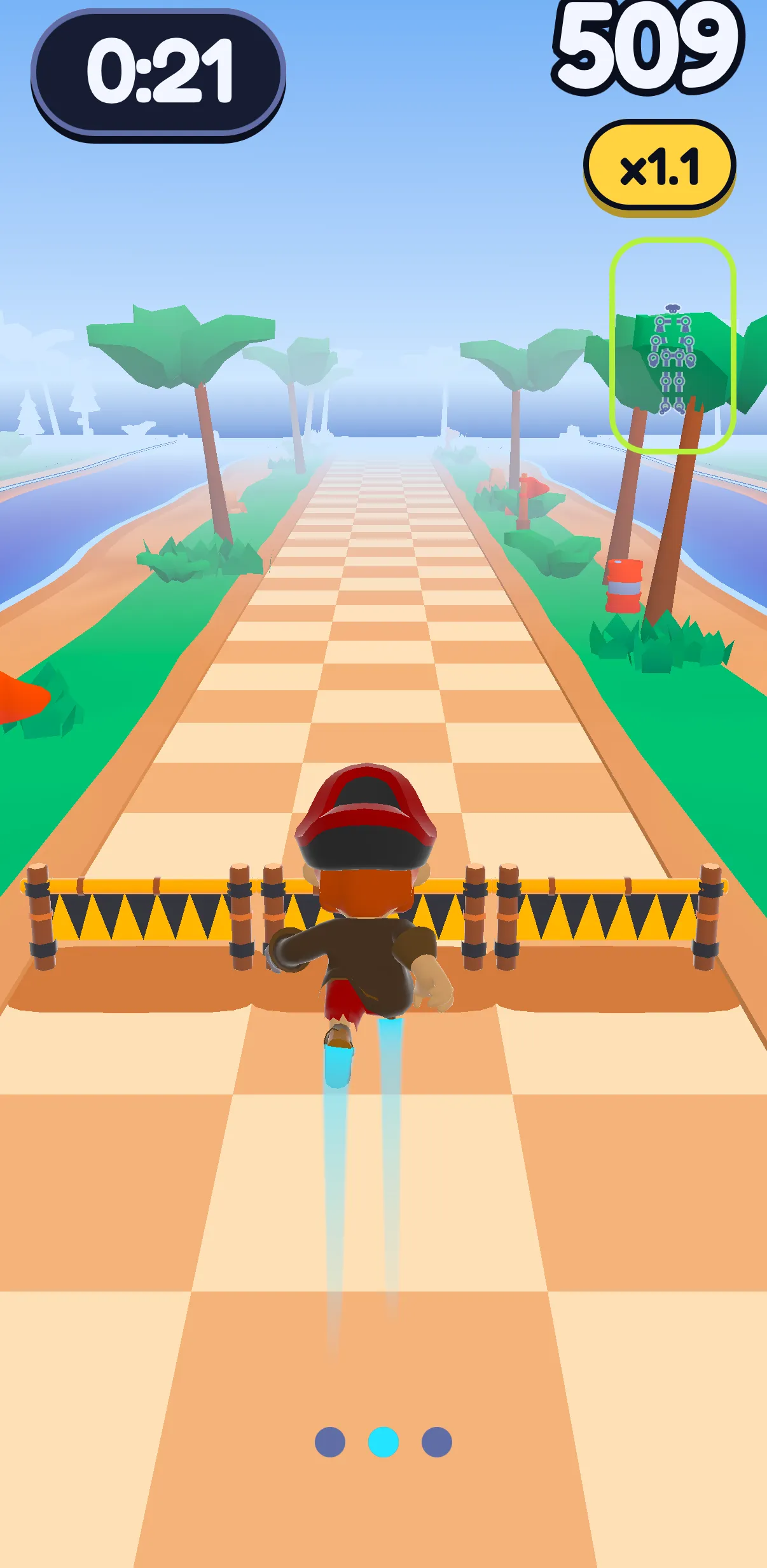
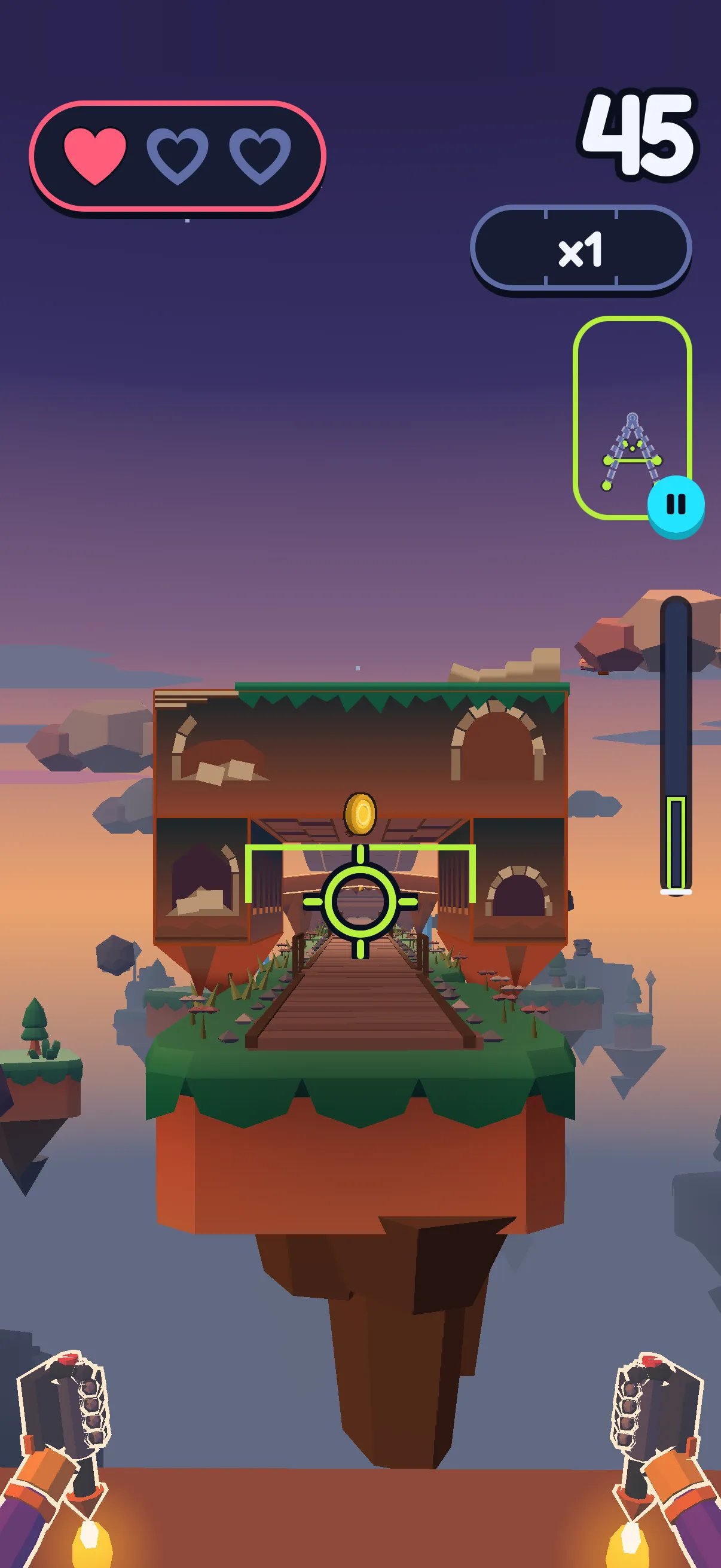
What the camera reads. In the Runner, you jump a low barrier, squat under a high gate and step aside to switch lanes, the phone standing "two meters away, whole body in view", as the app says. In Push Flight, you hold a plank facing the phone, which stands on the floor against a wall, never flat: your head sets how high Sway, SWADE's weasel, flies through the gates, and your shoulders count the push-ups.
What it counts. The Runner adds up your jumps and squats; stepping aside moves the pirate but doesn't count. In Push Flight, a full drop of your shoulders is one push-up and a shallower one part of one; straight arms never count ("Bend your elbows! That doesn't count."), and knee push-ups count the same. The total comes at the end, rounded down. The "This month" card on your Profile adds up the month's jumps, squats and push-ups.
What it says to you. Where to stand and what to do: "Almost! Step back to fit your feet." Lose the camera in the Runner and the game waits; in Push Flight, hands out of the picture means "Push-ups on hold."
What it doesn't do. No form score, no technique correction, no voice coach, no program, no counter for other exercises. One player, one phone, and today it plays on the phone screen. The day's session on the Path, in the Runner, is free; each game in Play, Push Flight included, spends one energy, which refills over time, except Push Flight's guided warm-up.
That's narrower than the apps above: it won't count your curls or check your deadlift. What it gives instead is a reason to do the reps: a barrier to clear, a gate to fly through.
Your camera stays on your phone
In SWADE, the camera, the pose tracking and the counting of your moves run on your phone: no image, no video, not one frame leaves it. What travels is the outcome of a game: a score, your jumps, squats and push-ups. Two exceptions, only while "Help improve SWADE" is on, as it is at first: a few numbers on how the camera followed you in Push Flight, sent with usage stats under a random ID, never your account; and now and then a short sample of your moves drawn as a stick figure of 33 points, never an image, with no account attached, over Wi-Fi only. You can switch it off in Settings. Our servers are in the EU. Details in the privacy policy.
That isn't unique: Form Coach, GymCam and FormLens say your video stays on the phone too, and the policies of Zing and FormLens say the points reach their servers, as SWADE's samples reach ours. What sets SWADE apart isn't privacy. It's that the camera is there for a game.
What this guide doesn't cover
- Body scans. That isn't counting, and we don't cover it.
- Calories and weight. We don't talk about them here.
- Pain, an injury or rehab. A doctor first.
- A whole program. For apps that plan full workouts, see our guide to the best workout apps for beginners.
- Playing on a TV or a computer. Today, SWADE plays on the phone screen.
Frequently asked questions
Is there an app that counts your reps?
Yes. Camera apps count while you move: GymCam says it counts any exercise, Form Coach counts and scores every rep, and Motion Coach works in a browser. A watch or a phone's motion sensor counts some moves too. RepCount, Hevy and Strong are logs: you type the reps in.
Is the RepCount app free?
Yes, for logging. Its App Store listing says it's "free, with no ads and no limit on workouts, routines or exercises"; RepCount Premium adds charts, personal records, supersets, drop sets and export. It's a log: its listing describes no automatic counting.
How to track gym reps?
Type them into a log app or a notebook, let a camera app count them, or keep count with a watch or a clicker. A log also keeps your weights; check whether a camera counter does.
Can an AI app check your workout form?
Some score it from your joints on the video. FormLens scores a filmed lift out of 100 with one fix; Form Coach scores each rep live. Test the score on reps you know are good and bad. It isn't a medical check: if a move hurts, see a doctor.
Do camera workout apps send your video anywhere?
It depends on the app and the feature. Form Coach, GymCam and FormLens say your video never leaves the phone. Zing's privacy policy (March 2025) says it stores the points from your workouts on its servers, not the video; FormLens's policy (October 2026) says it sends the points and the measurements taken from them. Motion Coach's policy says it sends masked images to Google's Gemini for form correction. Check what "on-device" covers.
Does SWADE count reps?
In its two games, yes: the Runner counts jumps and squats, Push Flight counts push-ups, and the "This month" card adds them up. It isn't an all-purpose counter: you can't pick another exercise, and there's no form score.
Is SWADE free?
Yes. The day's session is free, with XP and your streak. Playing more spends energy, which refills over time. Premium is optional: unlimited energy and unlimited day savers, and the yearly plan starts with a 14-day free trial. Push Flight is played from Play, so each game spends one energy; your first, a guided warm-up, is free.