Squat Counter Apps: Phone, Camera, Watch or a Game That Counts
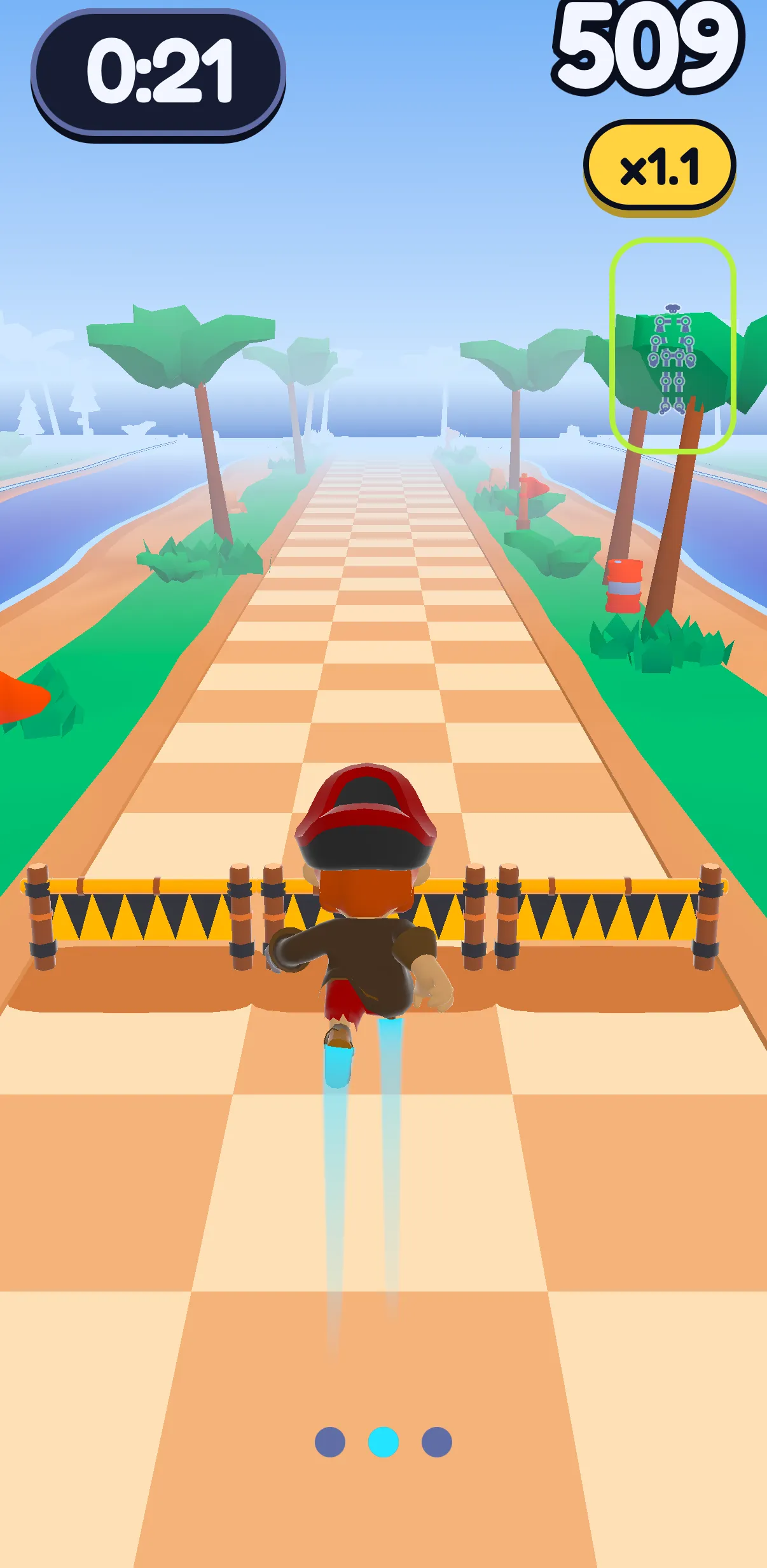
A squat counter app counts your squats for you: a motion sensor feels the phone you hold against your thigh, the camera follows your hips and knees, or a watch or earbuds feel you move. Web pages count through your camera too. Each draws its own line for depth. In SWADE's Runner, a squat slides a pirate under a gate.
In this guide
- What a squat counter does
- How to count squats: five ways, from your thigh to your browser
- Squat counter apps compared
- Phone on you, or in front of you: what each counter can tell
- How deep is one squat? Every counter draws its own line
- Squat counter, squat tracker app or challenge app?
- Which squat counter fits you
- SWADE's Runner: a squat takes you under the gate
- Your camera stays on your phone
- What this guide doesn't cover
- Frequently asked questions
What a squat counter does
A squat counter counts your squats while you do them, so your mind stays on the squat, not the number.
The word covers very different tools. When we searched "squat counter" on Google on October 20, 2026, the first three results were an iPhone app you hold against your thigh, an Android tracker built around a daily squat goal, and a free web page that counts through your camera.
A squat is a standing move, so the phone can ride on you instead of watching you.
How to count squats: five ways, from your thigh to your browser
- The phone on you. It rides on your body and feels itself go down and come back up. Squat Counter! - Auto Count says "Put iPhone on your thigh", then tap start, hold it and squat. SquatTrack lets you "press the phone on your lap, or hold it with both hands"; Squat AI Counter's sensor mode wants it held "vertically against your body". No camera, but a hand stays on the phone.
- The camera, watching your whole body. The phone stands in front of you, and pose tracking follows your hips and knees. Squat AI Counter has a camera mode, Squat Counter: Camera Count does it on Android, and SquatTrack added one in its July 2026 update.
- A watch or earbuds. DunDun counts squats with the motion sensors of an iPhone, an Apple Watch or AirPods. Garmin's Venu 4 counts reps in a strength workout from the arm wearing it, and its manual warns: "Leg exercises may not be counted."
- A web page. SquatCount, whose page is titled Squat Counter AI (not the Squat AI Counter app), runs in your browser with MediaPipe pose tracking: no app, no account. For "squat counter GitHub", one example is Manas Pange's Squats Counter, shown on Experiments with Google in October 2021: a small Arduino board worn on your thigh, with its code on GitHub.
- You count. Out loud, on a tally counter, or in a tracker where you type the number. It works for any squat, and nothing checks it.
Squat counter apps compared
Read on October 24, 2026, with US store prices. Check again before you pay.
| App | What it reads, and where the phone sits | Platforms | Camera and data, in its words | Price (US) |
|---|---|---|---|---|
| Squat Counter! - Auto Count (Intersect) | The iPhone held on your thigh; the listing doesn't name the sensor | iPhone | No camera among the permissions it lists; privacy label: data "used to track you" | Free, with ads |
| SquatTrack - Squat Counter | Motion sensor, the phone on your lap or in both hands; camera pose detection since July 2026 | iPhone, Apple Watch | Privacy label: "Data Not Collected" | Free download; membership $4.99 a month |
| DunDun - Squat Counter | Motion sensors of an iPhone, an Apple Watch or AirPods | iPhone, Apple Watch | "All data stays on your device, with no server storage"; privacy label: usage and diagnostics data, "Not Linked to You" | Free download; in-app purchases from $0.99 |
| Squat AI Counter | Camera, counting "when your hips approach your knees", or the phone held against your body | iPhone, iPad | Privacy label: "Data Not Collected" | Free |
| Squat Counter: Camera Count (Cooltime Studio) | Camera; you choose how strict: Strict, Normal or Easy | Android | "Camera video is never saved or sent"; Data safety label: may share "Device or other IDs" | Free, with ads |
| Squat Counter - Auto Counting | Camera, the phone set up in front of you; it counts "only when you perform a proper squat" | Android | Data safety label: may collect "Personal info, Photos and videos and 2 others" | Free, with ads |
| Squat Counter - Squats Tracker (Adzo Media) | Not said; built around a daily squat goal | Android | Data safety label: "No data collected" | Free download; in-app purchases |
| SquatCount (squatcount.com) | Camera, in a web page, your whole body in view | Browser | "Your video never leaves your browser"; the site may show Google ads and use Google Analytics | Free, no account |
| SWADE, the Runner | Camera: a squat slides the pirate under a high gate | iPhone and Android, coming soon | On the phone: no image leaves it | Coming soon. Free, energy for more games; Premium optional |
Sources, read October 24, 2026: each app's US App Store or Google Play listing and privacy label; squatcount.com and its privacy policy; Garmin's Venu 4 manual; Apple Support; Experiments with Google; British Powerlifting. Apple, Apple Watch, watchOS, AirPods, iPhone, iPad, App Store, Google, Google Play, Android, MediaPipe, Garmin, Venu, Arduino, GitHub and the app names in this guide are trademarks of their respective owners. SWADE is independent and is not affiliated with, sponsored or endorsed by any of them.
Phone on you, or in front of you: what each counter can tell
A squat bends your knees and hips at once, but a counter only knows what its sensor reads.
| Counter | Where it sits | What it reads | What it can't tell |
|---|---|---|---|
| Motion sensor | On your thigh, against your body, in your hands | The phone going down and back up | How your knees and hips moved: only the phone's trip |
| Camera, in an app or a web page | Standing in front of you, your whole body in view | Your hips, knees and ankles | Anything outside the frame |
| Watch | On your wrist | The arm wearing it | Your legs, except through that arm: on Garmin's Venu 4, "Leg exercises may not be counted" |
| Earbuds | In your ears | Your head going down and back up | How your legs got it there |
| You | In your head, or on a tally | What you tell it | Nothing gets checked |
A watch only feels your wrist: Garmin's Venu 4 counts a rep "when the arm wearing the watch returns to the starting position". Squat with your hands on your hips, and see what yours does.
Where the picture goes. A sensor counter has no picture to send. For a camera counter, read the listing, then the privacy label: the table above quotes them. How to read those labels: our guide to push-up counter apps. Camera apps that coach a whole workout are in our guide to rep counter apps that use your camera.
How deep is one squat? Every counter draws its own line
A counter doesn't see a squat. It sees a signal cross a line, and where that line sits decides your total.
- Powerlifting draws a strict one: a squat is valid once "the crease of the hip joint is below the top of the knee joint", in British Powerlifting's words.
- Squat AI Counter counts "when your hips approach your knees".
- Squat Counter: Camera Count lets you pick Strict, Normal or Easy.
- SquatTrack's sensor counts when the phone moves "downwards and then upwards".
- SquatCount puts its line at the top: if it isn't counting, its FAQ says, "reset to a standing position after each rep".
At home, nobody asks you for competition depth. What makes a count worth keeping is a line that stays put: the same depth every time, so this week's total compares with last week's. If squatting deep hurts your knees, hips or back, stop and ask a doctor first.
Before you trust a counter, find its line in four tries:
- Set up exactly as the app asks.
- Five slow, full squats. Say each number out loud: the app should land on five too.
- Two half squats. Whatever it does now tells you where its line is.
- Stand still and move only what it reads: lower and raise the phone, swing your wrist, nod with earbuds in. If that counts too, you've learned what it counts: the trip, not your legs.
The full method: how to test any counter before you trust it, in our push-up counter guide.
Squat counter, squat tracker app or challenge app?
Search for a "squat tracker app" or a "squat challenge app" and you'll find apps that don't all count. Four kinds:
- Counters count for you: the sensor, camera, watch and earbud apps above.
- Trackers keep the tally and the goal. Squat Counter - Squats Tracker, on Google Play, offers to "Set daily squat goals" and "track your results", without saying how it counts.
- Challenge apps set the number. A plan gives you the reps for each set of each workout, and you follow it: Zen Labs Fitness's squat trainer has you "perform the instructed number of reps", with voice cues.
- Screen-time apps trade squats for time on your phone: SquatTrack's latest update lets you "Earn Screen Time with Squats".
Plenty do several things at once: DunDun counts and adds "streaks, medals, and challenges". A challenge's numbers are someone else's plan, not one made for you.
Which squat counter fits you
| Your situation | Best fit | Why |
|---|---|---|
| You want a count without a camera | A motion-sensor app | The phone rides on you; nothing films you |
| You want the counter to see your legs | A camera counter | It follows your hips and knees |
| You squat with a watch on | A watch app that names squats | Test it: a watch reads your arm |
| You'd rather not download an app | A counter in a web page | Nothing to install; read its privacy policy first |
| You want a goal for each day | A tracker or a challenge app | It keeps the tally; check whether it counts |
| Counting bores you | A game where a squat does something | The game keeps the count while you dodge |
| Squats hurt your knees, hips or back | A doctor first | No app can tell you why it hurts |
| You're under 15 | Not SWADE | SWADE is made for players aged 15 and up |
SWADE's Runner: a squat takes you under the gate
SWADE is a fitness game app, coming soon to iPhone and Android: prop up your phone and its camera turns your moves into the controller. It isn't a squat counter you start and stop: it counts moves inside its two games. Push Flight reads push-ups. In the Runner, a pirate runs down three lanes on a pirate island; you jump a low barrier, step aside from a wall, and squat to slide under a high gate.
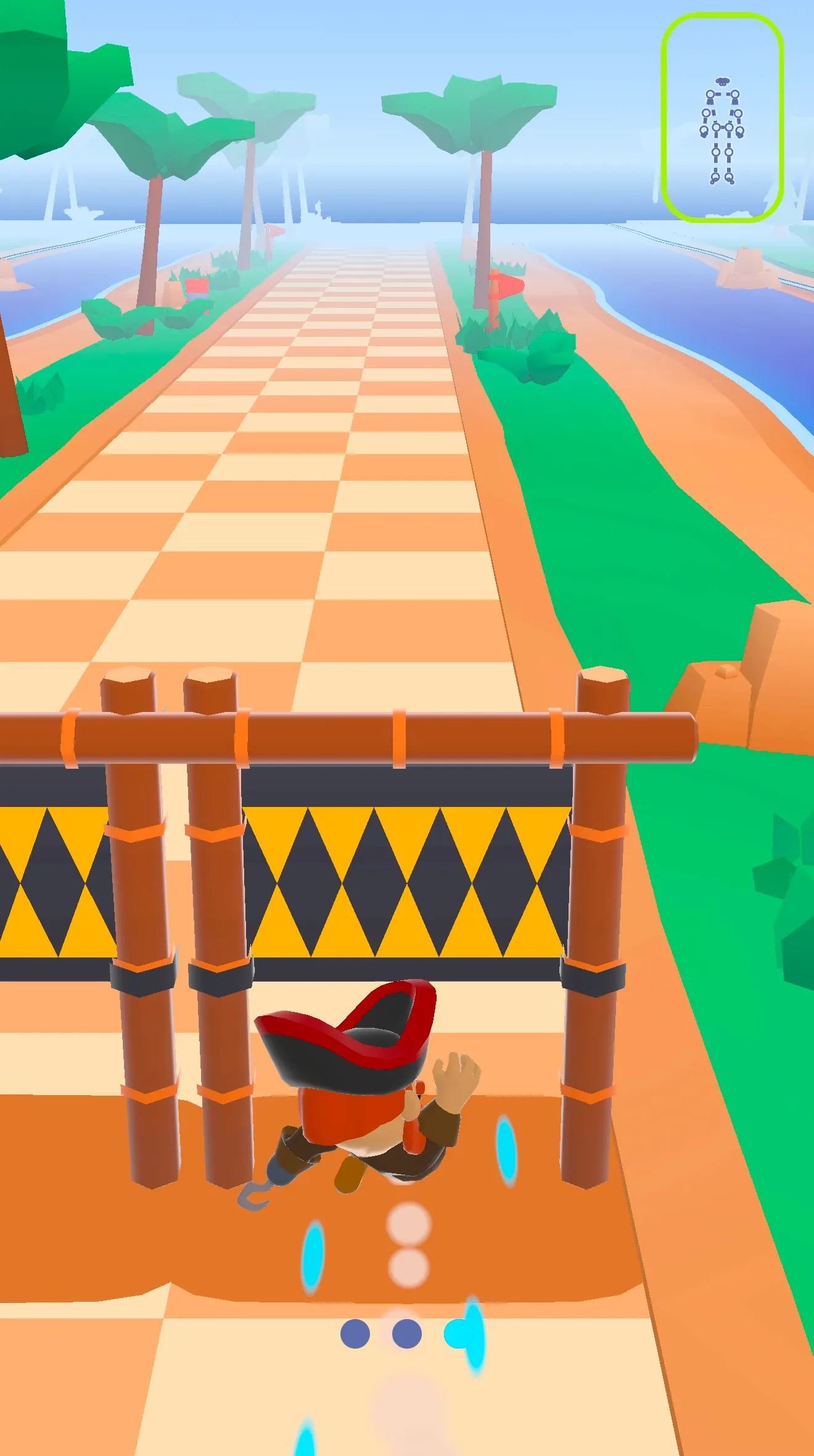
The track picks. Gates come up at random among barriers and walls, so you never know how many squats the next stretch holds. A gate across all three lanes is never followed by another full-width obstacle, so you can get back up. You don't choose a set of squats.
What counts. The Runner adds up the squats and jumps the camera reads during a run. Your Profile's This month card shows the month's squats, jumps and push-ups; the Runner's page under Your games adds jumps and squats together as Moves. For the count, a squat is a full trip: down past the game's depth, and back up. Turn back too early, and it isn't counted. That depth is the same at every level.
Setting up. Stand the phone up about two meters away, your whole body in view. Sway, SWADE's weasel, tells you when to move ("Almost! Step back to fit your feet."), then asks you to stand still ("Stand tall, arms down."). If the camera loses you, the game waits.
Going easy on your knees or back? In Profile › Settings › Health, choose Knees or Back. Jumps come out, barriers become walls, no more than two gates come in a row, and every run starts with a squat ("Squat to start"). The squats stay, just as deep. Any doubt about exercising? Ask a doctor first. More in our guide to low-impact cardio.
Starting at your level. The first time you open SWADE, you pick a level, Beginner, Intermediate or Advanced, and your first try is squats on the beat.
What it doesn't do. No counter for a free set, no squat challenge, no daily squat target, no plan for your legs, no form score, no watch or web version.
Your camera stays on your phone
In SWADE, the camera and the pose tracking run on your phone: no image, no video, not one frame leaves it. What travels is the result of a game: a score, your moves. Two exceptions, only while "Help improve SWADE" is on, as it is at first: a few numbers on how the camera followed you in Push Flight, sent with usage statistics under a random ID, never your account; and now and then a short sample of your moves drawn as a stick figure of 33 points, never an image, sent over Wi-Fi only, with no account attached. You can switch it off in Settings. Our servers are in the EU. Details in the privacy policy.
What this guide doesn't cover
- How many squats to do, in a row or in a day. No number here: a coach or a doctor who knows you can set one.
- Pain in your knees, hips or back. A doctor first.
- Squats with weights and machines. Barbells, racks and their counters aren't covered here.
- Calories and weight. Not covered here.
- Playing on a TV or computer. Today, SWADE plays on the phone screen.
Frequently asked questions
Is there an app that counts squats?
Yes, many, and plenty are free to download. Some feel the phone you hold against your thigh, like Squat Counter! - Auto Count on iPhone; some watch you through the camera, like Squat Counter: Camera Count on Android; DunDun counts on a watch or earbuds. Before you trust one, do five slow squats and two half ones, and see what it says.
Can an Apple Watch count squats?
Some apps say so: DunDun counts squats with an Apple Watch's motion sensors. Apple's own page on workout types, read on October 24, 2026, doesn't describe counting reps. A watch sits on your wrist, so test it with your hands on your hips: Garmin's Venu 4 manual warns that leg exercises may not be counted.
Is there a squat counter online?
Yes. SquatCount counts squats in a web page through your camera, free and with no account, and says your video never leaves your browser. Keep your whole body in view, and stand all the way up after each squat.
How do you count squats?
One squat is a trip down and back up to standing. How far down is the counter's rule: powerlifting asks for the hip crease below the top of the knee; apps set their own line. Keep the same depth every time, and your count means something.
Does SWADE count squats?
Yes, inside its games. In the Runner, a high gate asks for a squat, and the squats the camera reads during a run add up on your Profile's This month card. It isn't a free counter: the track decides when you squat, with no daily target or challenge.
Can you play SWADE without jumping?
Yes. Pick Knees or Back in Profile › Settings › Health: jumps come out, barriers become walls, and each run starts with a squat. The squats stay. Any doubt about exercising? Ask a doctor first.
How long is a SWADE session?
It depends on you. A Path session is a timed run sized to your level, and you see its length before you start. Chasing a record? You keep running until your last heart.
Is SWADE free?
Yes. The day's session is free, with XP and your streak: it's played in the Runner, squats included. Playing more spends energy, which refills over time. Premium is optional: unlimited energy and unlimited day savers, and the yearly plan starts with a 14-day free trial.